Guide to Seamlessly Integrate Into Any System in 2026
Master how to seamlessly integrate into any system in 2026 with step by step strategies, tools, and best practices to drive efficiency and future proof your business.
published
In 2026, the ability to seamlessly integrate into any system defines digital transformation and operational success. As organizations face complex, ever-changing technology landscapes, mastering integration is no longer optional.
This practical guide is designed to empower both businesses and individuals with actionable steps, proven strategies, and the latest tools for smooth system integration. You will discover how to assess compatibility, follow a clear integration process, overcome common challenges, and harness automation and AI to future-proof your efforts.
Ready to transform your approach? Let’s begin your journey toward effortless integration in a connected world.
Understanding System Integration in 2026
Today, the ability to integrate into any system is central to staying competitive, secure, and agile. As digital transformation accelerates, organizations must navigate increasingly complex environments, blending cloud, on-premise, and hybrid solutions. The challenge? Achieving connectivity across diverse platforms without friction.
Defining System Integration in the Modern Era
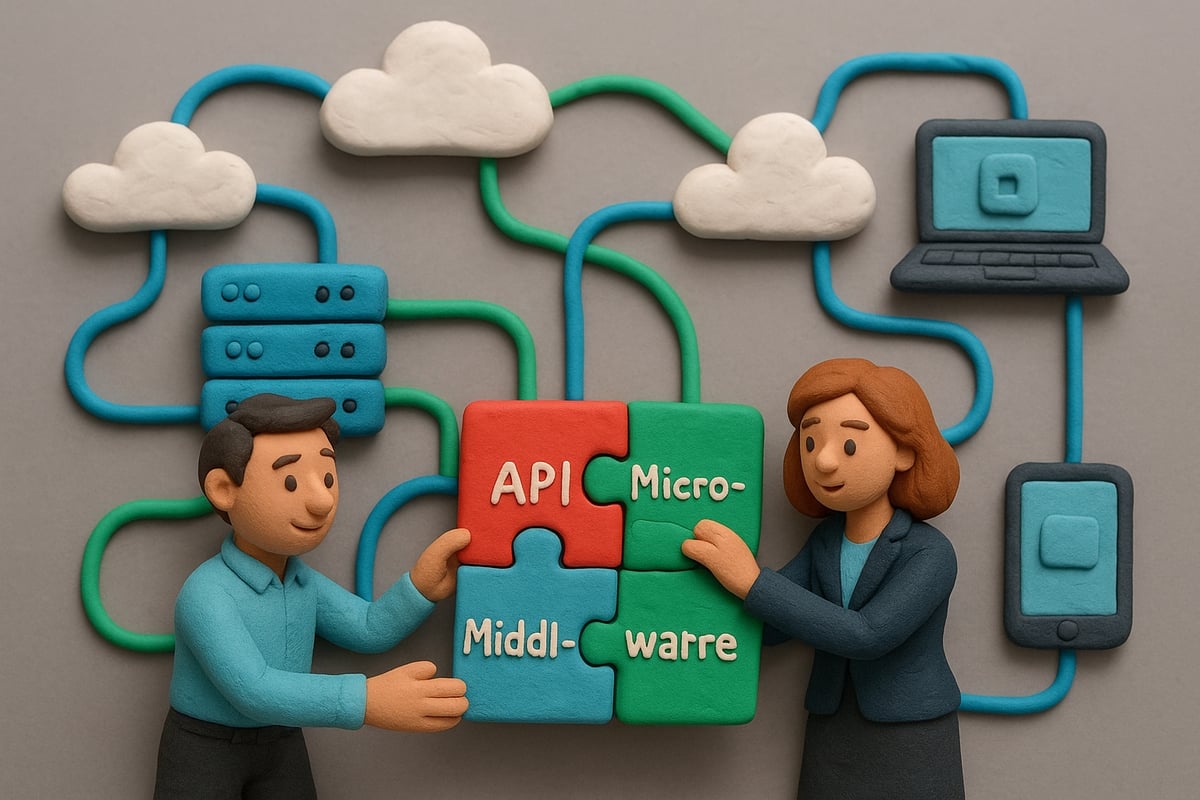
System integration in 2026 means much more than linking software. It is the process by which businesses integrate into vast digital ecosystems, combining cloud services, on-premise infrastructure, and hybrid environments. This involves orchestrating data, applications, and workflows so they function as a single, unified entity.
Key enablers include APIs, microservices, and middleware. APIs allow systems to communicate in real time, microservices break applications into smaller, manageable parts, and middleware acts as the glue that connects everything. But it is vital to distinguish between integration, interfacing, and interoperability:
Term | Definition | Example |
|---|---|---|
Integration | Combining systems for seamless operation, often with shared workflows | CRM and ERP sharing customer data |
Interfacing | Creating a connection or bridge, but not full workflow or data unification | Exporting data from one tool to another |
Interoperability | Ensuring different systems can exchange and use information effectively | Healthcare systems sharing patient records |
Across sectors, the need to integrate into complex environments is clear. In finance, banks combine legacy systems with cloud-based analytics. Healthcare providers connect electronic health records across platforms. Manufacturers blend IoT devices, automation, and ERP systems. SaaS vendors rely on real-time APIs to offer unified customer experiences.
As data volume and velocity surge, real-time data exchange and unified workflows are now essential. Companies aiming to integrate into modern systems must adopt advanced strategies and frameworks, as explored in the System integration strategies blog.
Why Seamless Integration Matters More Than Ever
Seamless integration is now a business imperative. Organizations that integrate into their digital ecosystems effectively enjoy greater agility, improved customer experiences, and significant cost savings. According to industry surveys from 2025, 78% of organizations view integration as critical to digital transformation.
Conversely, poor integration leads to data silos, inefficient processes, and heightened security risks. For example, when companies fail to integrate into their core platforms, they often struggle with duplicate data, inconsistent reporting, and compliance headaches.
Consider a global retailer that decided to integrate into a unified cloud and on-premise system. By automating data flows and standardizing APIs, they reduced onboarding time by 40% and gained a real-time view of inventory. This competitive edge allowed them to respond faster to market changes and customer demands.
The integration landscape is also shifting rapidly. Manual, one-off connections are giving way to automated, intelligent processes that adapt as systems evolve. As companies continue to integrate into complex environments, embracing automation and intelligence will be key to future-proofing their operations.
Assessing System Compatibility and Readiness
Before you integrate into any new system, it is vital to understand both your current technology landscape and your overarching business objectives. A thorough assessment enables you to identify potential roadblocks and opportunities, ensuring that you integrate into your target environment as smoothly as possible. This section provides a practical roadmap for evaluating compatibility and readiness in 2026.

Conducting a Comprehensive System Audit
To successfully integrate into complex digital ecosystems, start with a structured system audit. Begin by cataloging all current hardware, software, and cloud assets. Document each component's version, configuration, and support status.
Next, map out integration points and dependencies. Identify which platforms and applications must communicate and where data flows intersect. Pay close attention to data mapping and schema alignment, as mismatches here can cause major setbacks when you integrate into new solutions.
Evaluate legacy systems versus modern platforms. Legacy systems often require custom connectors or middleware, while modern platforms may support API-first strategies. Use tools and frameworks designed for compatibility assessment, such as automated inventory scanners, system dependency analyzers, and data mapping utilities.
System Audit Checklist:
Inventory all systems and applications
Document software versions and configurations
Identify integration points and data flow paths
Map data schemas and field types
Evaluate legacy system constraints
Select compatibility assessment tools
For deeper guidance, consider exploring High-value integration insights to see how leading organizations approach system audits and extract maximum value as they integrate into new environments.
Establishing Integration Objectives and KPIs
Defining what you hope to achieve before you integrate into any system is essential. Start by setting clear business goals, such as reducing onboarding time, enhancing reporting accuracy, or improving customer experiences.
Translate these goals into measurable KPIs. Common metrics include system uptime, transaction latency, error rates, and user adoption levels. Align your integration objectives with the broader digital strategy to ensure that every effort supports your organization's mission.
Sample KPI Table:
KPI | 2026 Benchmark | Target Value |
|---|---|---|
System Uptime | 99.99 percent | 99.999 percent |
Data Latency | Under 100 ms | Under 50 ms |
Error Rate | Less than 0.5 percent | Under 0.2 percent |
User Adoption | 75 percent in 3 months | 90 percent in 3 months |
Build a cross-functional integration team, bringing together IT, business, and operational stakeholders. This collaborative approach ensures that diverse perspectives are considered as you integrate into your chosen systems.
Regularly review objectives and KPIs, adjusting as needed to support continuous improvement. By following these steps, you can integrate into any environment with confidence and measurable success.
Step-by-Step Guide to Seamless Integration
Successfully integrating into any system in 2026 requires a precise, structured approach. This guide breaks the process into four essential steps, ensuring you can integrate into complex environments with confidence and minimal disruption.
Step 1: Planning and Design
Every successful effort to integrate into a new system starts with a thorough plan. Begin by mapping out all current systems and defining the integration objectives. Engage stakeholders from IT, business, and operations to ensure all requirements are captured.
Carefully select the most appropriate integration architecture. Whether you choose point-to-point, hub-and-spoke, ESB, or iPaaS, consider how each will help you integrate into existing and future environments. For deeper insights on architecture strategies, refer to the System Interoperability Guide 2026.
Risk assessment should be an early priority. Identify potential obstacles, such as data format mismatches or security gaps. Develop mitigation plans to address these issues before implementation begins.
Planning Phase Checklist:
Inventory all systems and data sources
Define integration objectives
Select integration architecture
Engage all relevant stakeholders
Assess risks and create mitigation strategies
Establish a detailed project timeline
By following these steps, you lay a solid foundation to integrate into any system, regardless of complexity.
Step 2: Choosing the Right Tools and Technologies
Selecting the right tools is critical when you integrate into modern digital ecosystems. Evaluate leading integration platforms and middleware, focusing on scalability, security, and compliance.
When comparing tools, consider the following criteria:
Compatibility with your current and future systems
Built-in connectors and API support
Security certifications and compliance features
Vendor support and community resources
Below is a comparison table of popular integration tools in 2026:
Platform | Scalability | Security Features | Open-source/Commercial | API Support |
|---|---|---|---|---|
FlowConnect | High | Advanced | Commercial | Extensive |
OpenBridge | Medium | Standard | Open-source | Good |
SyncSphere | High | Advanced | Commercial | Excellent |
IntegrateX | Medium | Basic | Open-source | Moderate |
Open-source solutions may offer flexibility and cost savings, while commercial platforms often provide advanced support and compliance. Choose the solution that best aligns with your integration goals.
Making informed technology choices ensures you can integrate into robust, future-ready systems.
Step 3: Implementation and Testing
With your blueprint and tools in place, the next phase is to integrate into your target systems effectively. Begin with configuration and custom coding, adhering to best practices for maintainability and security.
Minimize disruptions by rolling out integrations in stages. Use a staging environment to validate each component before moving to production. Automated testing frameworks are essential, covering unit, integration, and end-to-end scenarios.
Version control is critical. Maintain clear documentation of all changes and establish rollback plans in case of unexpected issues.
Real-world Implementation Timeline Example:
Week 1-2: Environment setup and initial configuration
Week 3-4: Custom coding and API integration
Week 5: Automated testing and validation
Week 6: Staged rollout and monitoring
By following a disciplined approach, you can integrate into new workflows smoothly, reducing errors and downtime.
Step 4: Monitoring, Optimization, and Support
Once you integrate into a new system, continuous monitoring is essential. Set up real-time dashboards to track performance metrics like latency, error rates, and system uptime.
Optimization should be ongoing. Use load balancing and caching to enhance performance as demand grows. Establish clear support channels and incident response processes to address any issues quickly.
Collect feedback from users to identify areas for improvement. Review dashboard metrics regularly to ensure your integration remains healthy and aligned with business objectives.
By maintaining a proactive support and optimization strategy, you ensure that you can integrate into evolving systems seamlessly, both now and in the future.
Overcoming Common Integration Challenges
Successfully integrate into any system requires overcoming both technical and organizational hurdles. In 2026, as businesses strive to integrate into increasingly complex digital environments, these challenges can make or break operational success. Understanding the landscape of potential obstacles is the first step toward seamless integration.

Navigating Technical and Organizational Barriers
When organizations attempt to integrate into new systems, they frequently encounter technical obstacles. Common issues include:
Data format mismatches between legacy and modern platforms
Protocol differences that interrupt smooth data flow
Security and compliance requirements, such as GDPR and HIPAA
Technical challenges can be compounded by organizational dynamics. Resistance to change is a frequent barrier, especially when cross-departmental communication is lacking or siloed. Teams may struggle to integrate into workflows that differ from their established routines.
Legacy systems often present additional difficulties. Their outdated architecture may lack support for modern APIs or middleware, complicating efforts to integrate into agile, cloud-based environments. Vendor lock-in can further restrict flexibility, making it costly to migrate or adapt.
A case study from the finance sector highlights these risks: a large institution failed to integrate into a unified payment system due to inadequate data mapping and poor stakeholder alignment. The result was fragmented processes and regulatory compliance gaps. Addressing such risks requires careful planning and ongoing review—refer to Privacy considerations for integration for guidance on meeting legal and security standards.
Strategies for Minimizing Downtime and Data Loss
To integrate into complex systems without disruption, organizations must focus on proactive risk management. Key strategies include:
Implementing robust backup and disaster recovery plans to ensure data integrity
Using staging environments for safe, controlled testing before deploying to production
Applying synchronization techniques, such as real-time replication or batch processing, to keep data consistent across platforms
Downtime and data loss can severely impact business operations. Automated failover systems have proven effective, with statistics showing a 40 percent reduction in unplanned outages for companies that integrate into their infrastructure using these tools.
Regular monitoring and iterative improvements are essential. By collecting feedback and conducting frequent reviews, teams can adapt their integration approach and respond swiftly to new challenges. Ultimately, the ability to integrate into any system with minimal risk depends on a blend of robust technical practices and organizational alignment.
Leveraging Automation and AI for Future-Proof Integration
As digital ecosystems grow more complex, organizations must integrate into new technologies efficiently to stay competitive. Automation and artificial intelligence now form the backbone of future-proof system integration strategies. These advancements not only simplify technical processes but also empower teams to integrate into evolving systems with minimal friction.
The Role of Automation in Modern Integrations
Automation has redefined how organizations integrate into diverse environments by streamlining repetitive integration tasks. Companies now deploy workflow automation platforms to handle data syncing, error management, and real-time reporting. This shift enables teams to focus on innovation rather than tedious maintenance.
Key automation benefits include:
Reduced manual intervention: Robotic Process Automation (RPA) tools can cut manual workload by up to 60 percent, freeing up valuable IT resources.
Improved consistency: Automated processes help integrate into systems with fewer errors and greater reliability.
Faster deployment: Automated pipelines accelerate time-to-value when businesses integrate into cloud, on-premise, or hybrid infrastructures.
To maximize these gains, organizations should follow process automation best practices in 2026, focusing on scalable platforms and continuous monitoring. By embracing automation, teams can integrate into new workflows while minimizing disruption and downtime.
Integrating AI for Smart, Adaptive Systems
Artificial intelligence transforms how businesses integrate into complex digital landscapes. AI-powered tools now handle data mapping, detect anomalies, and predict maintenance needs before issues arise. These smart integrations are adaptive, learning from real-time data to optimize performance.
AI-driven integration features:
Self-healing systems: AI can detect failures and automatically correct them, ensuring stable operations as teams integrate into sophisticated infrastructures.
Predictive analytics: Machine learning models anticipate bottlenecks and guide optimization when organizations integrate into expanding ecosystems.
Enhanced ROI: AI-enabled integration platforms deliver measurable value, as over 68 percent of organizations expect to have integrated AI agents by 2026, according to AI Agents Integration by 2026.
To integrate into this AI-driven future, companies must prepare their teams with training and change management. Embracing AI in integration processes not only boosts efficiency but also ensures adaptability as technology evolves.
Best Practices and Future Trends in System Integration
Adopting the right approach to integrate into any system in 2026 means more than just technical expertise. It requires a company-wide commitment to continuous improvement and an eye on emerging trends. Let us break down how organizations can foster best practices and prepare for the future of system integration.
Building a Culture of Continuous Integration and Improvement
To successfully integrate into complex environments, organizations must prioritize collaboration across IT, business, and external partners. Open communication and shared goals break down silos, making integration smoother and more resilient.
Consistent documentation is essential. Keep technical manuals, process guides, and integration blueprints up to date. This not only accelerates onboarding but also ensures that teams can quickly adapt if requirements change. Regular training sessions empower staff to integrate into evolving systems confidently and efficiently.
Establishing a habit of routine integration reviews and audits helps identify bottlenecks and areas for optimization. Leading organizations utilize continuous integration pipelines, where every code change is automatically tested and deployed, reducing errors and downtime.
Example:
A global SaaS provider implemented a continuous integration pipeline, which led to a 40% decrease in deployment failures and faster feature releases. Their success came from cross-functional teams, clear KPIs, and a proactive approach to feedback and documentation.
Looking to integrate into your own workflows with the latest solutions? Consider joining the integration solutions waitlist to stay ahead and access early resources.
Emerging Trends and Technologies Shaping Integration in 2026
Staying competitive means preparing to integrate into new technologies as they emerge. Low-code and no-code integration platforms are rising rapidly, empowering business users to automate connections without deep technical skills. This shift increases agility and helps organizations integrate into various systems at scale.
Edge computing and IoT devices are playing a greater role in integration strategies. As more data is generated and processed at the edge, organizations must integrate into distributed environments while maintaining security and performance. Security-first integration design is now a must, with encryption, identity management, and compliance checks built into every layer.
Quantum-safe integration protocols are beginning to appear, offering protection against future quantum computing threats. Early adopters are already piloting these protocols to integrate into sensitive workflows confidently.
Curious about how AI-driven infrastructure will affect your ability to integrate into future systems? See this AI-Driven Infrastructure Bottlenecks Forecast for expert insights on upcoming challenges and solutions.
In the next five years, expect to see integration become even more intelligent, automated, and user-driven, ensuring organizations can integrate into any system—no matter how complex or distributed.